Creating New AWS Access & Secret Key
Apito AWS Lambda Function Extension needs Access and Secret Key in-order for your logic function to operate. You can use your old credential if you have any, but it is recommended to create a new IAM in AWS for apito.
Creating AWS Users for apito
Login to AWS Console and navigate to IAM Section. Click on the Users from the Left side menu and click Add user button. Follow the steps below to create a new user
- Enter a User name and on Access Type select Programmatic access and click Next
- Set permissions by selecting
Attach existing policies directlytab like below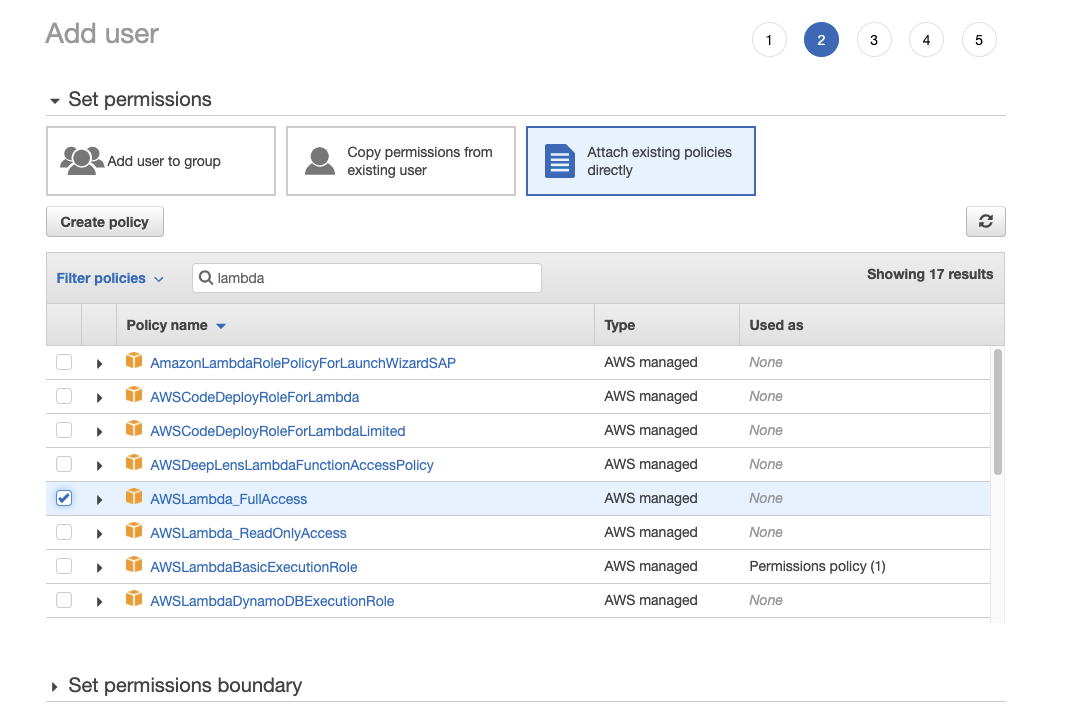
- Search for
lambdapermission and checkAWSLambda_FullAccess. Click next - Add your tags ( Skip it if you do not know what it is). Click next
- Click on
Create userbutton
Congratulation! You have successfully created a new user in AWS that has Lambda Access.
note
Be sure to save your Access Key ID and Secret access key to someplace safe.
You need these two in-order to enable AWS Extension in apito.